

Facebook is one of the most blocked websites in the world. Schools block it to reduce distractions. Workplaces block it for productivity. Some countries restrict it entirely. Whatever the reason, if you need access to Facebook and can't get it directly, a proxy site is the fastest solution.
The Fastest Way: Use a Free Proxy Site
A free proxy site routes your connection through an intermediary server. The network you're on (school Wi-Fi, office network, or your ISP) sees you connecting to the proxy — not to Facebook directly. If Facebook is blocked but the proxy site isn't, you get through.
Step-by-step: Access Facebook with SiteProxy
- Open your browser (Chrome, Firefox, Safari, Edge — any works)
- Go to siteproxy.ai
- In the URL input box, type
facebook.com - Select a server node (US or Europe nodes work best for Facebook)
- Press "Start Proxy Browser"
- Facebook loads through the proxy — browse, post, and message normally
This works on any device: laptop, desktop, phone, or tablet. No installation, no account needed.
Why SiteProxy Works Well for Facebook
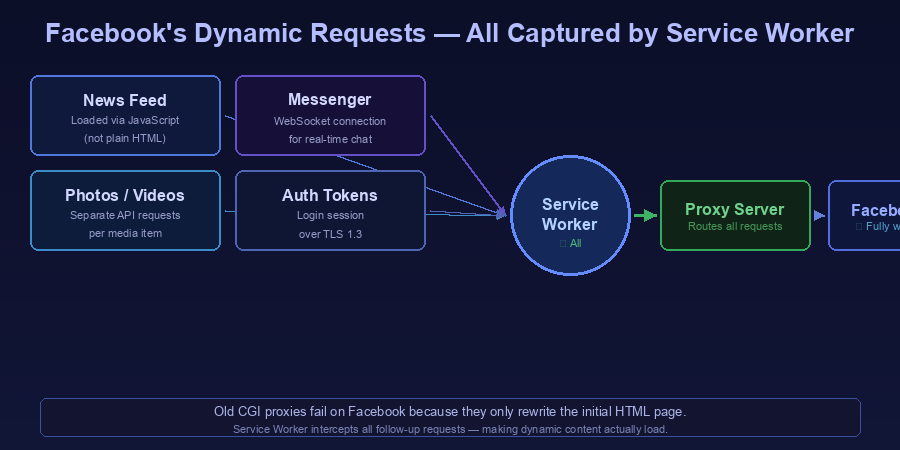
Facebook is a complex, JavaScript-heavy application. Older proxy technologies (CGI proxies that rewrite HTML) often fail with Facebook because:
- The News Feed loads via JavaScript, not HTML
- Chat and Messenger use WebSocket connections
- Photos and videos load via separate API requests
- Login requires secure credential handling
SiteProxy's Service Worker architecture intercepts all these requests — not just the initial page load — which means Facebook's dynamic content actually loads and works through the proxy.
What You Can Do on Facebook Through a Proxy Site
Through SiteProxy, you can:
- View your News Feed
- Like and comment on posts
- View and post to your profile
- Access Facebook Groups and Pages
- Watch Facebook videos
- Use Marketplace (browse listings)
- Open Facebook pages through a TLS-protected proxy session
Messenger: Basic messaging works through the proxy. For the best Messenger experience, try loading messenger.com instead of using the embedded Messenger in Facebook.
Limitations
Speed: The proxy adds latency. Video calls through Messenger may not work well, and live streams may buffer. For video calling, a dedicated VPN is better.
Facebook may detect proxy IPs: Facebook occasionally identifies traffic coming from proxy/data center IPs and may ask for additional verification (phone number or CAPTCHA). This is rare but can happen, especially if many users share the same proxy IP.
Not a permanent solution for country-level blocks: If Facebook is blocked at the ISP/government level in your country and you need reliable, long-term access, a paid VPN with a no-logs policy provides more consistent unblocking.
What to Do If the Proxy Site Is Blocked
Some networks block proxy sites as well as Facebook. Try these in order:
1. Try a different proxy site: Keep backup options bookmarked — best free proxy sites in 2026 has a full list. ProxyOrb and CroxyProxy are reliable alternatives.
2. Use your phone's mobile hotspot: Enable Personal Hotspot on your phone, connect your laptop to it, and use your phone's mobile data. This completely bypasses the school or workplace network filter.
3. Try a VPN extension: If you can install browser extensions, a reputable free VPN extension (Windscribe, Browsec) can unblock Facebook and other sites persistently.
Proxy Site vs. VPN for Facebook Access
| Free Proxy Site | VPN | |
|---|---|---|
| Setup time | Seconds | Minutes |
| Cost | Free | Usually paid |
| Facebook works? | Yes | Yes |
| Messenger calls | Limited | Full support |
| Always-on? | Open tab needed | Runs in background |
| Best for | Quick, occasional access | Regular use, privacy |
For occasional access — checking your feed or messaging someone — SiteProxy is the right tool. For regular Facebook use where you need Messenger calls and consistent speed, a paid VPN is worth considering.
Frequently Asked Questions
Can Facebook detect that I'm using a proxy site?
Facebook sees the proxy server's IP address, not your real one. It can detect that the request comes from a data center IP (typical of proxy and VPN services). This usually doesn't prevent browsing, but may trigger security checks on login.
Is it safe to log in to my Facebook account through a proxy site?
SiteProxy uses TLS 1.3 encryption between your browser and SiteProxy, but a browser proxy is not the right place for sensitive account activity. Use a direct trusted connection for private messages, account recovery, payments, or anything involving important credentials.
Why does Facebook look different through a proxy?
Some visual elements may render slightly differently due to the URL rewriting process. Functionality is preserved, but fonts, images, or layout details may occasionally differ from the direct version.
Does this work in countries where Facebook is banned?
A proxy site can bypass ISP-level blocks in many cases. However, in countries with deep packet inspection (DPI) or more sophisticated internet controls, a proxy site may not be sufficient. A VPN with obfuscation features is more effective in those environments.
Does the proxy site work for Facebook on mobile?
Yes. SiteProxy works in mobile browsers on iOS (Safari, Chrome) and Android (Chrome, Firefox). Open your mobile browser, go to siteproxy.ai, and enter facebook.com.
Conclusion
If Facebook is blocked on your network, SiteProxy is the fastest way to access it — no download, no account, open the site and go. Its Service Worker technology handles Facebook's complex JavaScript and dynamic content better than older proxy tools.
For more on using proxy sites to access blocked websites, see our complete guide to proxy sites and our best free proxy sites ranking.