


YouTube is the world's largest video platform, but it's also one of the most commonly blocked sites — by school networks, workplace filters, and government restrictions in certain countries. If you can't access YouTube directly, a proxy site is the fastest solution.
This guide covers the best proxy sites for YouTube in 2026, what makes them work well with YouTube specifically, and how to get the best streaming experience through a proxy.
Why YouTube Specifically Needs a Good Proxy Site
YouTube isn't just a static website. It uses:
- Adaptive bitrate streaming — Video quality adjusts based on your connection
- Heavy JavaScript — The YouTube interface is almost entirely JavaScript-driven
- Multiple API calls — Comments, recommendations, and metadata load via background requests
- Authentication — If you're signed in, your account credentials need to flow through the proxy
This means a basic CGI proxy (the old-style web proxy that only rewrites HTML) often fails with YouTube. You might see the page, but video playback breaks, comments don't load, or the interface glitches.
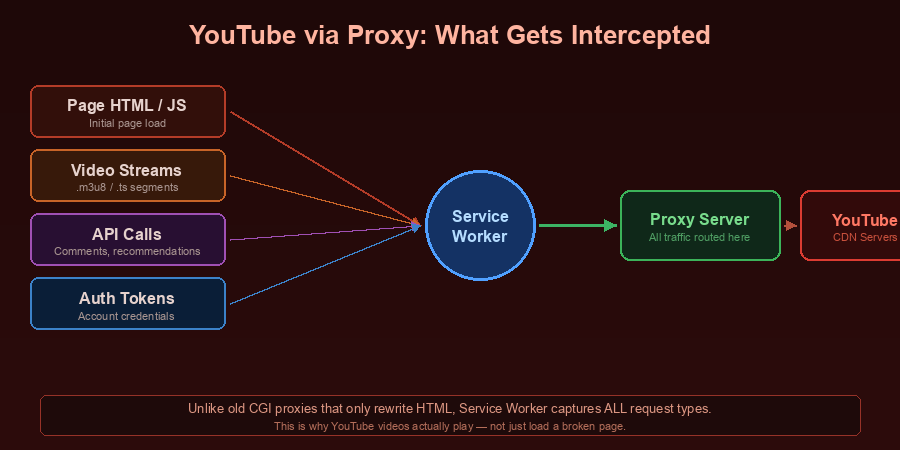
The solution: A modern proxy site that uses Service Worker technology to intercept all browser requests — not just the initial page load.
Best Proxy Site for YouTube: SiteProxy
SiteProxy is the top recommendation for YouTube access because it's built on Service Worker technology specifically designed to handle JavaScript-heavy sites like YouTube.
How SiteProxy handles YouTube:
When you access YouTube through SiteProxy, a background Service Worker script intercepts every network request your browser makes. This includes:
- The YouTube page itself
- Video stream requests (the
.tsor.mp4segments that make up the video) - API calls for comments and recommendations
- Authentication tokens if you're signed in
- Advertisement and tracking requests (which the proxy routes through its servers)
This means YouTube loads and plays video far more reliably than through older proxy technologies.
Steps to watch YouTube via SiteProxy:
- Go to siteproxy.ai
- In the URL input box, type
youtube.comor paste the full URL of the video you want to watch - Select a server node (US or Japan nodes tend to work well for YouTube)
- Press Enter — YouTube loads through the proxy
- Watch videos normally
Free vs. VIP nodes: SiteProxy's free nodes provide decent video quality for standard (up to 1080p) YouTube content. For 4K streaming and minimal buffering, the VIP nodes offer higher throughput.
Other Proxy Sites That Work With YouTube
ProxyOrb
A solid backup option if SiteProxy is blocked on your specific network. Uses similar technology and handles YouTube reasonably well.
CroxyProxy
Has YouTube-specific optimization in its interface. The free tier has some limitations, but it handles basic YouTube playback.
What to Do If YouTube Is Still Blocked
If the proxy site itself gets blocked (schools and workplaces sometimes block proxy sites by domain), try these in order:
-
Try a different node — SiteProxy has US, Japan, Germany, Hong Kong, and Singapore nodes. A node that's blocked at the network level on one may not be on another.
-
Try a different proxy site — ProxyOrb, CroxyProxy, and others offer the same basic functionality. Keep 2-3 bookmarked.
-
Use your mobile data hotspot — If you have mobile data (4G/5G), enable your phone's Personal Hotspot and connect your laptop to it. This completely bypasses the school or workplace network filter.
-
Consider a VPN — For persistent, high-quality YouTube access with no restrictions, a paid VPN (ProtonVPN, Mullvad) provides more reliable unblocking than a free proxy site.
Tips for Better YouTube Streaming Through a Proxy Site
Choose the right server node. Select a server geographically close to YouTube's content delivery network (CDN) for your region. For most users, a US or European node works best for English-language YouTube content.
Lower the video quality. If video buffers a lot, manually set YouTube quality to 720p or 480p. The stream will be smoother because each quality tier requires less bandwidth through the proxy.
Use the mobile YouTube site. Go to m.youtube.com instead of youtube.com. The mobile site loads faster and uses less JavaScript, which means better proxy compatibility.
Open in a new tab. SiteProxy offers an "Open in New Tab" button. If the embedded proxy browser isn't rendering YouTube correctly, this option opens the proxied site in a full browser context which often works better.
Proxy Site vs. VPN for YouTube
| Proxy Site (SiteProxy) | VPN | |
|---|---|---|
| Setup | Zero — open browser | Install app |
| Cost | Free | $5–15/month |
| YouTube quality | Good (up to 1080p free) | Excellent |
| Reliability | Good | Excellent |
| All apps? | Browser only | Full device |
| Best for | Quick access | Consistent streaming |
If you need to watch YouTube occasionally from a restricted network, SiteProxy is the right choice — it's free and starts working in seconds. If you stream YouTube regularly from a geo-restricted location, a paid VPN with servers in the right country will provide a more consistent experience.
Frequently Asked Questions
Does using a proxy site for YouTube affect video quality?
Yes, slightly. The proxy adds one extra hop in the network path, which can increase latency and reduce maximum throughput. On SiteProxy's free tier, 1080p YouTube works well for most users. For 4K, a VIP node or paid VPN is more suitable.
Can I watch YouTube with a proxy site on my phone?
Yes. SiteProxy works in any modern mobile browser — Chrome, Safari, Firefox — on both iOS and Android. No app installation needed. Open your mobile browser, go to siteproxy.ai, and enter youtube.com.
Will YouTube know I'm using a proxy site?
YouTube sees the proxy server's IP address instead of your real IP. It doesn't know you specifically are using a proxy, but it knows the request came from a data center IP (not a residential connection). This is generally fine for watching videos. Some features like YouTube Premium geo-restrictions may behave differently.
Can I log in to my YouTube account through a proxy site?
Use a direct trusted connection for YouTube account login, payments, account recovery, or YouTube Premium settings. Proxy sessions are better for quick page access and video playback checks than sensitive account activity.
What if my school has blocked siteproxy.ai?
Try these alternatives in order:
- ProxyOrb (proxyorb.com)
- CroxyProxy (croxyproxy.com)
- Your phone's mobile hotspot (bypasses the school network entirely)
For more methods, see our guide on how to unblock websites at school.
Conclusion
For most users who need occasional YouTube access through a blocked network, SiteProxy is the best free proxy site for YouTube in 2026. Its Service Worker technology handles YouTube's JavaScript-heavy interface far better than older proxy technologies — videos load, play, and render correctly.
Go to siteproxy.ai, type youtube.com, pick a node, and start watching. The whole process takes under 30 seconds.