

"Proxy site" and "VPN" are often used interchangeably, but they're different tools that work in different ways. Choosing the wrong one can leave you with slow connections, blocked content, or more exposure than you wanted.
This guide explains the key differences between a proxy site and a VPN, and gives clear guidance on which to use for each situation.
What Is a Proxy Site?
A proxy site (also called a web proxy) is a website that fetches web pages on your behalf. You open the proxy site in your browser, enter a URL, and the proxy loads that page through its server.
Example: You go to siteproxy.ai, type youtube.com, and SiteProxy's server fetches YouTube and delivers it to your browser. YouTube sees SiteProxy's IP address, not yours.
Key characteristics:
- Works inside your browser only
- No installation required
- Usually free
- Starts working in seconds
- Handles one browsing session at a time
What Is a VPN?
A VPN (Virtual Private Network) creates an encrypted tunnel between your device and a VPN server. All network traffic from your device — not just your browser, but every app — flows through this tunnel.
Example: You install ProtonVPN on your laptop, connect to a server in the US, and now your entire device appears to be in the US. YouTube, Netflix, Spotify, Discord, and every other app uses the VPN connection.
Key characteristics:
- Covers all apps on the device
- Requires installation and usually an account
- Usually paid ($5–15/month)
- Takes a few minutes to set up
- Persistent — stays active until you disconnect
Key Differences: Proxy Site vs. VPN
Scope of Coverage
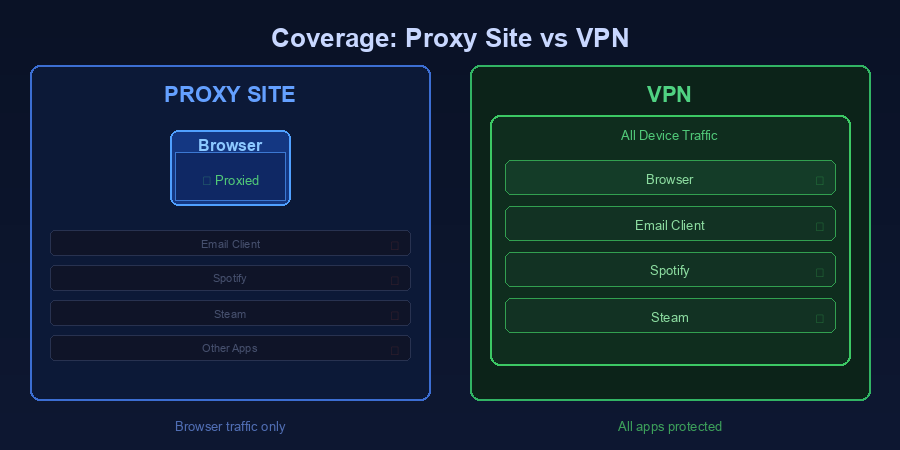
Proxy site: Covers browser activity only, and only within the proxy session. Other apps on your device (email client, Steam, Spotify) don't use the proxy.
VPN: Covers everything on your device — browser, apps, background services. If your game client or email app needs a specific IP, the VPN handles it.
Winner for breadth: VPN
Speed
Proxy site: Generally faster for browser use because it only handles one connection at a time, and modern proxy sites are optimized for this workload.
VPN: Slightly slower because all traffic is encrypted and routed through the VPN server, and the encryption/decryption overhead adds latency.
Winner for speed: Proxy site (for browser use)
Setup and Convenience
Proxy site: Zero setup. Open a browser tab, go to the proxy site URL, enter a URL, done. Works on any device including managed Chromebooks and school computers where you can't install software.
VPN: Requires installing an app on your device, creating an account (for most services), and remembering to connect. More steps, but once set up, it runs in the background automatically.
Winner for convenience: Proxy site
Cost
Proxy site: Free options widely available. SiteProxy is free with multiple server nodes.
VPN: Most reputable VPNs cost $5–15/month. Free VPNs exist but typically have bandwidth limits, fewer servers, and weaker privacy protections.
Winner for cost: Proxy site
Privacy
Proxy site: Your traffic between your device and the proxy server is encrypted (via HTTPS/TLS). However, the proxy service can process your requests. Reputable proxy sites publish clear retention and privacy policies.
VPN: Your traffic is encrypted end-to-end in the VPN tunnel. The VPN provider can see your traffic (they route it), but reputable providers have no-logs policies audited by third parties.
Winner for privacy: VPN (slightly, for serious use cases)
Bypassing Geo-Restrictions
Proxy site: Works well for browser-based geo-restrictions — accessing YouTube videos unavailable in your country, reading region-locked news sites, etc.
VPN: Works for all app-based geo-restrictions — streaming apps (Netflix, Disney+, Hulu), games, music services (Spotify regional libraries), and more.
Winner for geo-bypassing: VPN (for non-browser apps); Proxy site (for browser use)
Side-by-Side Comparison
| Feature | Proxy Site | VPN |
|---|---|---|
| Covers | Browser only | All apps |
| Setup | Zero (open URL) | App install + account |
| Cost | Free | $5–15/month |
| Speed | Fast | Slightly slower |
| Works on managed devices? | Yes | Usually not |
| Best for | Quick browser access | Full device privacy |
| Geo-restriction bypass | Browser only | All apps |
| Retention disclosure | Varies by provider | Varies by provider |
When to Use a Proxy Site
Use a free proxy site when:
- You need quick access right now — You're at school or work, a site is blocked, and you need access in the next 30 seconds without installing anything.
- You're on a device where you can't install apps — Managed Chromebooks, school computers, library computers.
- You only need browser access — You want to read a news article, watch a YouTube video, or check social media.
- You want it free — SiteProxy provides reliable, free proxy site access with multiple server nodes.
- Privacy isn't your top concern — You just need to bypass a content filter, not hide from sophisticated monitoring.
When to Use a VPN
Use a VPN when:
- You need all apps to route through the proxy — Streaming apps, game clients, email, messaging apps.
- You're on public Wi-Fi — A VPN protects all your traffic from network snooping, not just your browser.
- You need consistent geo-spoofing — Watching Netflix from another country requires a VPN with dedicated streaming servers that aren't on Netflix's block list.
- You need stronger privacy — Journalists, activists, or anyone in a high-risk situation should use a paid VPN with a verified no-logs policy, not a free proxy site.
- You need it always-on — VPNs run in the background and protect every connection without you having to think about it.
Can You Use Both?
Yes. Many people use a proxy site for quick, casual unblocking (checking social media at work) and a VPN for situations requiring stronger protection (using public Wi-Fi with sensitive accounts).
They serve different purposes and can coexist.
The Best Free Proxy Site and VPN Options
Best free proxy site: SiteProxy — no registration, multiple nodes, Service Worker technology for reliable JavaScript support.
Best free VPN: ProtonVPN free tier — no bandwidth limits, no-logs policy, slower than paid tier. Windscribe free tier — 10GB/month bandwidth.
Best paid VPN: ProtonVPN, Mullvad — both have strong no-logs policies, competitive pricing, and reliable geo-unblocking.
Frequently Asked Questions
Is a proxy site safer than a VPN?
Not necessarily. For serious privacy needs, a paid VPN with an audited no-logs policy provides stronger guarantees. A reputable proxy site with a clear retention policy is useful for casual browsing, but is not equivalent to a VPN for comprehensive privacy.
Can a proxy site unblock Netflix?
Sometimes. Netflix actively blocks known proxy and VPN IP addresses. A free proxy site may work temporarily but can stop working at any time. For consistent Netflix geo-unblocking, use a paid VPN that specifically advertises Netflix support and regularly updates its server IPs.
Does a VPN slow down browsing more than a proxy site?
Slightly. A quality VPN adds less than 20-30ms of additional latency, which is imperceptible for most browsing. Proxy sites are marginally faster for browser tasks because they have less encryption overhead. The difference is rarely noticeable in practice.
Are there situations where neither a proxy site nor a VPN works?
In countries with advanced internet censorship using deep packet inspection (DPI) — notably China and Russia — standard proxy sites and many VPNs are blocked. Specialized tools with obfuscation (Shadowsocks, Tor) are more effective in these environments.
Conclusion
Use a proxy site when you need quick, free, browser-based access to blocked websites. SiteProxy takes under 10 seconds to start using and works on any device without installation.
Use a VPN when you need broader protection — all apps, all traffic, persistent protection on public Wi-Fi. A paid VPN is worth the cost if you travel frequently, work with sensitive information, or stream content regularly from geo-restricted regions.
For most people, a free proxy site handles 80% of everyday unblocking needs. A VPN handles the remaining 20% where broader coverage matters.