


A proxy site — sometimes called a web proxy, site proxy, or online proxy — is a tool that lets you access websites through an intermediary server. Instead of your browser connecting directly to a site, the proxy server fetches the page for you and delivers it to your browser.
It sounds simple, and the basic idea is. But there's more depth to how modern site proxies work, and understanding it helps you use them more effectively. This guide covers everything from the basic concept to the underlying technology.
The Simple Explanation
Imagine you want to visit a website, but there's a wall in front of it — a firewall, a geo-block, or a network restriction. You can't reach the site directly.
A proxy site acts as someone who can get past the wall on your behalf. You tell the proxy what you want; the proxy fetches it and brings it back to you. The blocked site never knows who you are — it only sees the proxy. A free proxy site like SiteProxy makes this process instant and effortless.
How a Proxy Site Works: Step by Step
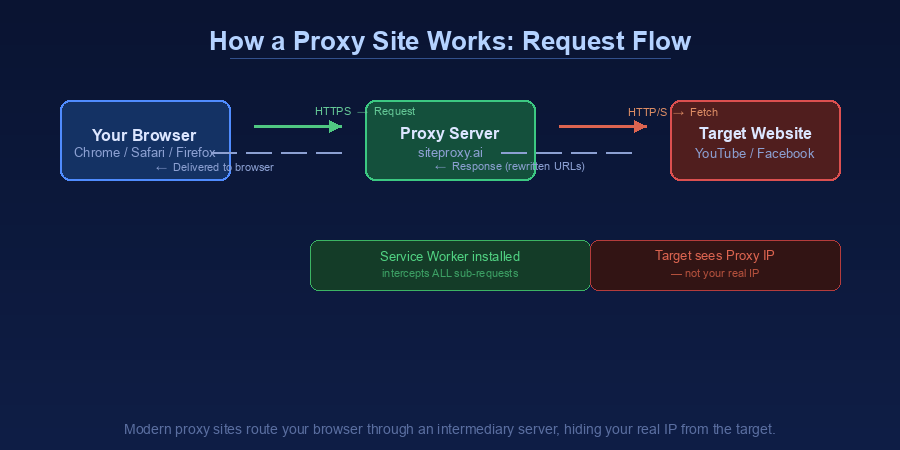
Here's what happens technically when you use SiteProxy to access a blocked site:
-
You enter a URL — You visit siteproxy.ai and type in the address of the site you want to access (e.g.,
https://www.youtube.com) -
Your browser connects to SiteProxy — Your browser makes a standard HTTPS request to the SiteProxy server
-
SiteProxy fetches the target page — The SiteProxy server makes a request to YouTube (or whichever site you entered) using its own IP address
-
URL rewriting happens — Before sending the page back to you, SiteProxy rewrites all the links, scripts, and resources in the page. This ensures that any further requests you make (clicking links, loading videos, etc.) also go through the proxy rather than directly to YouTube
-
Content is delivered to your browser — You see the target website's content in your browser, as if you were browsing it normally
-
Subsequent requests are intercepted — SiteProxy uses Service Worker technology to intercept every network request your browser makes while on the proxied page. This includes API calls, media streams, JavaScript files, and image requests — keeping the entire browsing session within the proxy
What Is Service Worker Technology?
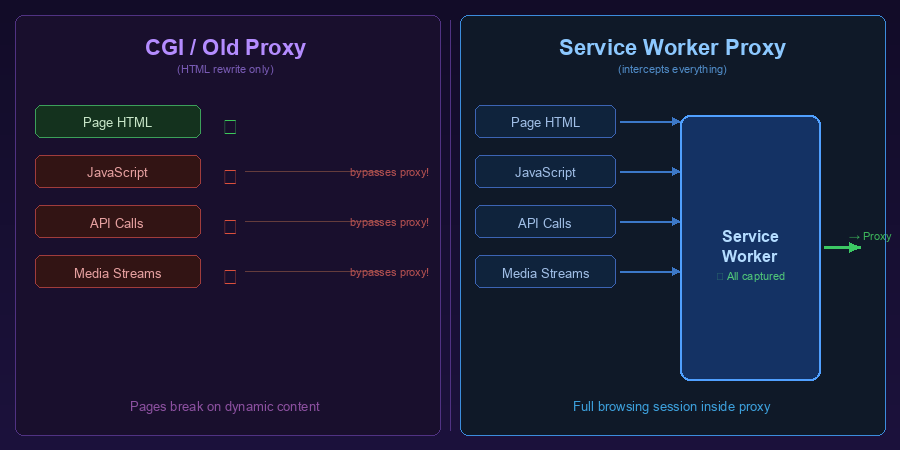
Traditional proxies (sometimes called CGI proxies) only rewrite the HTML of the initial page. When your browser makes follow-up requests (loading images, running JavaScript, making API calls), those often bypass the proxy and go directly to the original server — which can fail or expose your IP address.
Modern proxies like SiteProxy use Service Workers to solve this problem. A Service Worker is a script that runs in the background of your browser and intercepts all network requests from a web page. SiteProxy installs a Service Worker when you start a proxy session, and this worker ensures every subsequent request is routed through the proxy automatically.
The result: a much more complete, seamless browsing experience compared to older proxy technologies. JavaScript-heavy sites like TikTok, YouTube, and Twitter work far better with Service Worker-based proxies.
What Does a Site Proxy Hide?
When you use a site proxy:
From the target website:
- Your real IP address (they see the proxy's IP instead)
- Your approximate geographic location (based on IP)
From your local network (school, work, ISP):
- Which specific sites you're visiting (they see connections to SiteProxy, not to YouTube, etc.)
- The content of those pages (your traffic to SiteProxy is encrypted via HTTPS)
What it does NOT hide:
- Browser cookies and account logins (if you're logged in, the site still knows who you are)
- Browser fingerprinting (your browser's unique characteristics can still identify you)
- The fact that you're using a proxy (your network admin can see you're connecting to SiteProxy)
Common Reasons People Use Proxy Sites
Bypassing Network Restrictions
The most common use case. School and workplace networks frequently block social media, video sites, and entertainment content. A site proxy lets you access these sites even when the network filter blocks them directly.
Geographic Restrictions
Some websites are only available in certain countries. A site proxy with servers in the right location can make it appear as if you're accessing the site from that country.
Quick Privacy Browsing
For casual privacy — hiding your IP from websites you're visiting, or preventing basic IP-based tracking — a site proxy provides sufficient protection without the complexity of a VPN.
Research and Testing
Web developers and marketers use proxies to test how websites appear from different locations, or to access competitor content without revealing their company's IP address.
Accessing Archived or Blocked Content
Some content may be regionally blocked due to licensing, legal orders, or government censorship. A site proxy can provide access when direct access is unavailable.
Proxy Site vs. VPN: Key Differences
For a full comparison, see our proxy site vs VPN guide.
| Aspect | Proxy Site | VPN |
|---|---|---|
| What it proxies | Browser traffic only | All device traffic |
| Setup required | None | App installation |
| Speed | Fast (browser only) | Slightly slower (all traffic) |
| Cost | Free options available | Usually paid |
| Best for | Quick browser access | Full device privacy |
A proxy site is the better choice for quick, browser-based access. A VPN is better when you need to proxy app traffic (like a streaming app) or want full-device coverage.
Is Using a Site Proxy Legal?
In most countries, using a site proxy is legal. The proxy itself is simply a network routing tool. However:
- Bypassing employer or school network restrictions may violate acceptable use policies
- Accessing geo-restricted content may violate a service's terms of use
- Some countries restrict or prohibit the use of proxies and VPNs
Always check the laws and policies that apply to your specific situation.
How to Use SiteProxy
Getting started with SiteProxy takes about 10 seconds:
- Go to siteproxy.ai
- Type or paste the URL of the site you want to visit
- Press Enter
- Browse the site normally through the proxy
No account creation, no software download, no configuration. SiteProxy works on any device with a modern browser, including phones and tablets.
Frequently Asked Questions
Does a site proxy work on mobile?
Yes. SiteProxy works in any modern mobile browser (Chrome for Android, Safari on iOS, Firefox Mobile, etc.). No app download needed.
Why does a proxied site sometimes look different?
Some websites use advanced techniques that are difficult to fully proxy. Elements like embedded live streams, certain fonts, or complex animations may not render perfectly. For most sites, the experience is close to or identical to direct access.
Can the proxy be detected and blocked?
Websites can block known proxy IP addresses. SiteProxy regularly maintains its server infrastructure to minimize blocking. If a specific site blocks the proxy, you can try again later as new server IPs are added.
Is my browsing activity logged?
Check SiteProxy's privacy policy for current details on data handling. Reputable proxies log minimal data and are transparent about their policies.
Conclusion
A proxy site is one of the simplest, most accessible tools for accessing blocked content and browsing with basic privacy protection. Modern proxy sites like SiteProxy have significantly improved over older technologies, handling JavaScript-heavy sites with Service Worker technology that earlier proxies couldn't manage.
Whether you're dealing with school firewalls, workplace filters, or geographic restrictions, SiteProxy — one of the best free proxy sites available — lets you get past them in seconds. No installation, no configuration, no cost.
For more on choosing the right tool, see our guides on best free proxy sites and proxy site vs VPN.