

School networks block a lot. Social media, YouTube, gaming sites, streaming — all filtered. Sometimes even useful tools like Google Drive or Wikipedia get caught in over-zealous filters. A free proxy site for school lets you route around these blocks without installing anything.
This guide covers the best proxy sites for school in 2026, how to use them from any device, and what to do if a proxy site itself gets blocked.
Why a Proxy Site Works at School
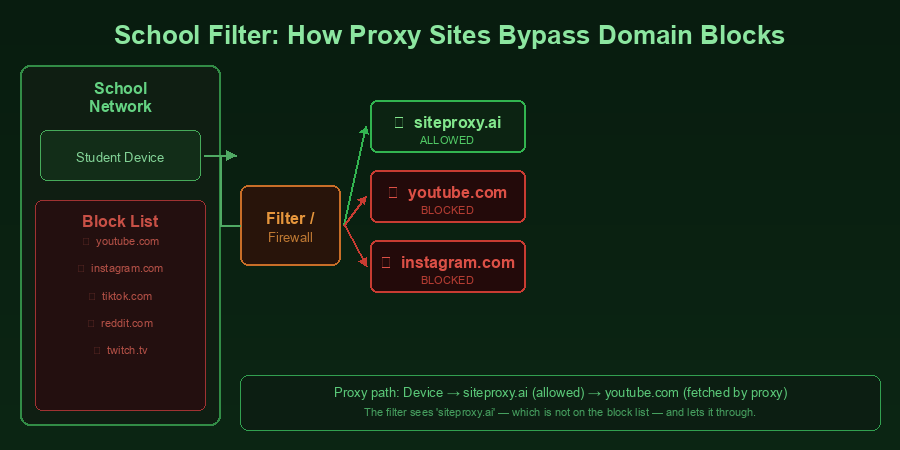
School networks block websites using a firewall or content filter. These systems maintain lists of blocked domains and prevent your browser from connecting to them directly.
A proxy site works by routing your connection through a different server. When you use SiteProxy to access YouTube, your browser connects to SiteProxy's server — not to YouTube directly. The school's filter sees a connection to SiteProxy (which it may not have blocked) and allows it through.
The key insight: School filters block specific websites, not all external connections. A proxy site that isn't on their block list gets through.
Top Free Proxy Sites for School
1. SiteProxy — Best Overall
Why it works at school:
SiteProxy uses Service Worker technology, which means it handles modern, JavaScript-heavy websites reliably. Many older proxy sites break when loading YouTube, Instagram, or TikTok because these sites load additional content dynamically. SiteProxy's Service Worker intercepts all of these requests, keeping the entire browsing session inside the proxy.
How to use at school:
- Open any browser (Chrome, Firefox, Edge, Safari — even on Chromebooks)
- Go to
siteproxy.ai - Type the URL you want to visit
- Start browsing
Works on school Chromebooks, school computers, and personal devices connected to school Wi-Fi. No installation, no account.
Multiple nodes: SiteProxy offers US, Japan, Germany, Hong Kong, and Singapore server nodes. If one node is slow, switch to another.
2. ProxyOrb
A reliable backup option when SiteProxy is blocked on a specific school network. Similar web-based approach, no registration needed. Keep it bookmarked as a fallback for your free proxy site needs.
3. CroxyProxy
Handles some dynamic content and has a clean interface. Works for YouTube and basic social media. A decent third option to have in your list.
How to Use a Proxy Site for School on Different Devices
Chromebook
Chromebook is the most common school device, and proxy sites work perfectly on them:
- Open Chrome browser
- Go to
siteproxy.aiin the address bar - Enter the site you want to access
- Browse normally
Note: School Chromebooks are often managed by the IT department. If the proxy site itself is blocked, the Chromebook's Chrome browser will show a blocked page. In that case, try a different proxy site or use your personal phone as a hotspot.
School Computer (Windows/Mac)
Same process as Chromebook. Open any browser available (Chrome, Edge, Firefox) and go to the proxy site URL.
Personal Device on School Wi-Fi
If you're using your personal laptop or phone on the school's Wi-Fi network, the same proxy sites work. Alternatively, you can use your phone's mobile data connection (hotspot) to bypass the school's filter entirely — this is the most reliable bypass if proxy sites are blocked.
What to Do If the Proxy Site Gets Blocked
Schools sometimes block specific proxy sites by domain. If siteproxy.ai is blocked, try these steps:
1. Try another proxy site:
- ProxyOrb (proxyorb.com)
- CroxyProxy (croxyproxy.com)
- 4everproxy (4everproxy.com)
Most school content filters can't block all proxy sites — there are too many, and new ones appear regularly.
2. Use your phone as a mobile hotspot: This is the most reliable option. Enable Personal Hotspot on your phone, connect your laptop to it, and you're on your phone's data — completely outside the school's network filter.
3. Ask IT to unblock the site: If you need access to a legitimate educational resource that was accidentally blocked (Google Scholar, Wikipedia, a research site), the correct approach is to ask your school's IT department to whitelist it. This works better than you'd expect.
Understanding School Proxy Site Policies
Using a proxy site at school may violate your school's Acceptable Use Policy, even if it isn't explicitly mentioned in the policy. Before using a proxy site:
- Check your school's internet policy
- Understand that network administrators can see you connected to a proxy service (even if they can't see what you accessed through it)
- Consider the consequences if your school enforces the policy
This guide is for informational purposes. You're responsible for complying with your school's policies.
Best Subjects to Use a Proxy Site For at School
Not everything blocked at school is blocked for good reasons. Common legitimate uses:
Research: Some schools block Wikipedia, Google Scholar, or academic databases. A proxy site can restore access for homework and research.
Language learning: YouTube contains enormous amounts of language learning content. If your language class involves video resources, a proxy site helps.
Programming: Some coding platforms, GitHub, or Stack Overflow may be blocked. For CS students, a proxy site for school is sometimes necessary for legitimate work.
Journalism/Media literacy: Access to international news sites for social studies, current events, or debate prep.
Proxy Site vs. VPN for School
| Free Proxy Site | VPN | |
|---|---|---|
| Installation | None | App required |
| Cost | Free | Usually paid |
| Works on Chromebook | Yes | Limited (needs install) |
| Speed | Good | Good |
| Blocked by school? | Sometimes | Sometimes |
For most students, especially those using Chromebooks where installation is restricted, a free proxy site for school is the practical choice. See our comparison in the best free proxy sites guide for more detail.
Frequently Asked Questions
Can teachers see what I'm doing through a proxy site?
Your teachers generally cannot see through the proxy in real-time. School network administrators can see that you connected to a proxy service, but the content you accessed through it is encrypted and not visible to them. However, some schools log proxy usage and may follow up.
Do proxy sites work on school Chromebooks?
Yes, web-based proxy sites like SiteProxy work in Chrome on managed Chromebooks. If the school's Chrome management policy blocks access to proxy sites via URL filtering, that site specifically will be blocked — but most schools don't block every proxy site.
Is incognito mode enough to bypass school filters?
No. Incognito mode only prevents your browser from saving history locally. The school's network filter operates at the network level and doesn't care about your browser's privacy settings.
What's the best proxy site for school that doesn't require an account?
SiteProxy requires no account, no registration, and no download. Open the site, enter a URL, and start browsing immediately. ProxyOrb is a good backup with the same no-account policy.
Can a proxy site get me expelled?
It's extremely rare to face serious consequences for using a web proxy. Most schools treat it as a minor AUP violation — a warning or short-term restriction of computer privileges. The key variable is what you're accessing, not the proxy itself. Accessing seriously prohibited content has consequences related to the content.
Conclusion
The best free proxy site for school in 2026 is SiteProxy. It requires nothing — no account, no download, no configuration — and works on any device including managed school Chromebooks. Its Service Worker technology means it handles YouTube, Instagram, and other JavaScript-heavy sites far better than older proxy tools.
Keep SiteProxy bookmarked, keep one or two backup proxy sites bookmarked too, and you'll have reliable access even if one site gets blocked on your school's network. For more information on using proxy sites for YouTube, see our dedicated guide.