

School networks are designed to block distractions and enforce content policies. But the same filters that block gaming sites often end up blocking legitimate research tools, creative platforms, and educational content. Getting blocked when you're trying to work is genuinely frustrating.
This guide covers the most effective methods to unblock websites at school in 2026, starting with the fastest and most accessible options.
Why Schools Block Websites
Before diving into solutions, it helps to understand why websites get blocked:
Distraction filtering — Social media (Instagram, TikTok), gaming, and video sites are commonly blocked to keep students focused
Bandwidth management — Video streaming consumes significant bandwidth on school networks; blocking it reserves capacity for academic use
Content compliance — Schools often filter adult content, gambling, and other categories to meet legal requirements for minor protection
Security — Some sites hosting downloads or running heavy JavaScript are blocked as a security precaution
Understanding this helps calibrate expectations: some sites are blocked for legitimate reasons, and some are blocked over-zealously.
Method 1: Use a Free Proxy Site (Fastest, No Setup)
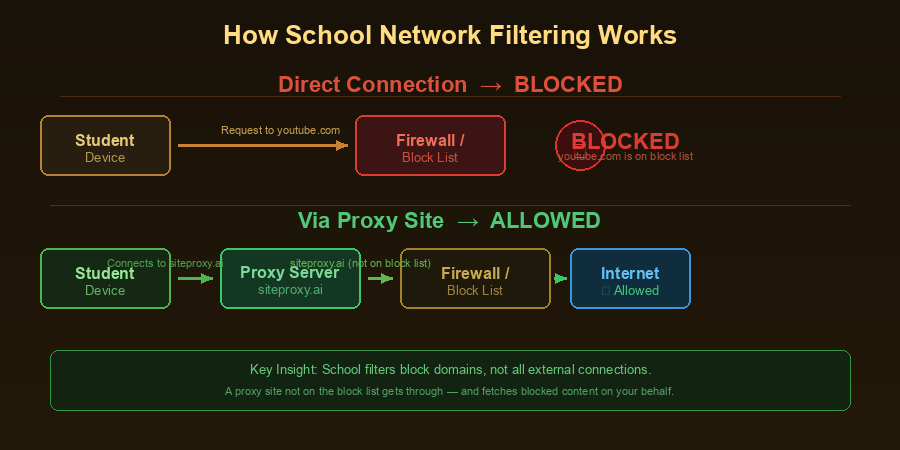
A free proxy site like SiteProxy lets you access blocked websites by routing your traffic through a proxy server. The school network sees you connecting to the proxy site — not to the blocked site directly. This is the most popular working proxy site method for school networks.
How to use SiteProxy at school:
- Open your browser (Chrome, Firefox, Safari, Edge — any will work)
- Go to siteproxy.ai
- Type or paste the URL of the site you want to visit
- Press Enter to start browsing through the proxy
That's it. No installation, no account, no configuration. Works on school computers, Chromebooks, and your personal phone connected to school Wi-Fi.
Why SiteProxy works well at school:
SiteProxy uses Service Worker technology, which means it correctly handles modern websites that rely heavily on JavaScript. Older proxy tools often break when sites use dynamic content — SiteProxy's approach handles TikTok, YouTube, Instagram, and similar sites much more reliably.
Limitation: The school may block siteproxy.ai itself. If that happens, try alternative free proxy sites (ProxyOrb, OnlineProxy, etc.) — most schools can't block all proxy sites. See our top free proxy sites for school guide for a full list.
Method 2: Use Your Phone as a Hotspot
If your phone has mobile data (LTE/5G), you can:
- Enable the Personal Hotspot feature on your phone (Settings → Personal Hotspot on iPhone; Settings → Network → Hotspot on Android)
- Connect your laptop or tablet to your phone's hotspot
- Browse using your phone's data connection instead of the school's Wi-Fi
This completely bypasses the school's network filter because you're not on the school's network at all.
Considerations:
- Uses your phone's mobile data — check your data plan limits
- May violate school device policies if using a school-owned laptop
- Slower than Wi-Fi for high-bandwidth activities
This is the most reliable method if you have mobile data available.
Method 3: Use HTTPS Versions of Sites
Some basic school filters block http:// URLs but not https:// equivalents. Simply adding https:// to the beginning of a blocked URL sometimes works:
Instead of http://example.com, try https://example.com
This only works on sites that support HTTPS (most modern sites do) and only against very basic filters. More sophisticated school firewalls block by domain name regardless of protocol.
Method 4: Try Alternative URLs and Mirrors
Some popular services have multiple domains or mobile versions:
- YouTube:
m.youtube.com(mobile version),youtu.be(short links) - Google:
google.com/search?q=...may work if the main page is blocked - Wikipedia:
en.m.wikipedia.org(mobile version)
These alternatives aren't reliable across all schools, but they're worth trying before resorting to more technical methods.
Method 5: Use a Browser-Based VPN Extension
If you can install Chrome or Firefox extensions:
- Install a reputable VPN extension (Windscribe, Browsec, or Hotspot Shield's browser extension)
- Enable the extension and choose a server location
- Browse through the VPN extension
Caveat: Many schools lock down Chromebooks to prevent extension installation. On personal devices, this works well.
Method 6: Use Tor Browser
The Tor Browser routes your traffic through multiple encrypted relays, making it very difficult to block or monitor. Download it from torproject.org and run it on a personal device.
Note: Tor is significantly slower than other methods due to multi-hop routing. It's effective for privacy and bypassing censorship but not ideal for video streaming.
Also note: Tor Browser requires installation. Don't install software on school-owned devices without permission.
Which Method Should You Use?
| Situation | Best Method |
|---|---|
| School computer, can't install anything | Site proxy (SiteProxy) |
| Personal laptop on school Wi-Fi | Site proxy or mobile hotspot |
| Phone connected to school Wi-Fi | Mobile hotspot (use your own data) |
| Chromebook with locked extensions | Site proxy |
| Strong privacy needed | Tor Browser (personal device) |
For most students, Method 1 (free proxy site) is the right starting point. It requires no permissions, no installation, and works on virtually any device. A working proxy site like SiteProxy is the fastest unblocking solution for school networks.
Important: School Policies
Using proxy tools at school may violate your school's Acceptable Use Policy (AUP) — even if the policy doesn't explicitly mention proxies. Before using any of these methods:
- Read your school's internet use policy
- Understand that network administrators can see that you're using proxy tools (even if they can't see what you're accessing through them)
- Consider whether the blocked site is worth the potential consequence
This guide is provided for educational purposes. You're responsible for complying with your school's policies and local laws.
What to Do If SiteProxy Gets Blocked
If your school has blocked siteproxy.ai:
- Try other proxy sites — ProxyOrb (proxyorb.com) and OnlineProxy (onlineproxy.org) offer similar functionality
- Use your mobile hotspot — This completely sidesteps the school's filter
- Ask IT to whitelist the site — If you need access to a legitimate site that was accidentally blocked, the right approach is asking your school's IT department to unblock it
Schools can block individual proxy sites, but new ones come online regularly. It's an ongoing challenge for network administrators.
Frequently Asked Questions
Can teachers see what I'm doing through a proxy?
Your teacher generally cannot see through a proxy in real-time. However, school network administrators can see that you connected to a proxy service, and some schools log this data. What you access through the proxy is typically not visible to the school, but your use of the proxy itself may be logged.
Does using a proxy slow down my browsing at school?
Slightly. Any proxy adds a small amount of latency. For general browsing and reading, this is barely noticeable. Video streaming through a proxy may buffer more than usual, depending on server load.
Is incognito mode enough to unblock websites at school?
No. Incognito mode only prevents your browser from saving your history locally. It has no effect on network-level filters. The school's firewall operates at the network level and doesn't care about your browser's privacy mode.
What if the school blocks all proxy sites?
Your most reliable option is then a mobile hotspot using your phone's data. This completely bypasses the school's network infrastructure. Alternatively, wait until you're off the school network to access those sites.
Can I get expelled for using a proxy at school?
It's extremely rare to face serious disciplinary action for simply using a web proxy. Most schools treat violations of internet use policies with warnings or short-term loss of computer privileges. However, if the proxy is used to access seriously prohibited content (adult content, hacking tools, etc.), the consequences would be related to that content, not the proxy itself. Know your school's policies.
Conclusion
The fastest and easiest way to unblock websites at school in 2026 is to use a free proxy site like SiteProxy. This best proxy site for school works in seconds, requires no installation, and functions on any device — school computers, Chromebooks, or your personal laptop.
For more proxy site options, see our top free proxy sites for school guide and our proxy site for YouTube guide.
If that's blocked, your phone's mobile hotspot is the most reliable fallback. And if you need stronger privacy, Tor Browser on your own device provides robust protection.
Choose the method that fits your situation, be aware of your school's policies, and use these tools responsibly.